www.gsmgateway.in

hero
Automated Outbound Calling Software

Automated Outbound Calling Software

Every sales team and customer success department and BPO operation has the issue. Their people spend time dialing phone numbers than they actually spend talking to potential customers. Automated outbound calling software fixes this problem. It dials the numbers for them skips the calls that nobody answers and only connects the agents to conversations. This really increases the amount of work they can do and the money they can make.

At GSMGateway.in we have. Set up outbound calling software for companies in India and all around the world. In this guide we will tell you how this technology works. We will talk about what features important and how it is different, from inbound call center software. We will also explain how your company can use it to get the money back.

What Is Outbound Calling Software ?

Outbound calling software is a tool that helps businesses make calls to their customers, people who might be interested in what they have to offer and buyers. This software does the dialing for the people making the calls so they do not have to do it themselves. It also helps get rid of calls that busy or not answered and it connects the people making the calls with the people they are trying to reach right away.

Modern outbound calling software can do a lot of things. It can help plan and manage calls keep track of how things going as they happen work with other systems that manage customer relationships, record calls and give managers information to help them make their calling operations better. Outbound calling software is really useful for businesses that make a lot of calls. Outbound calling software helps businesses make the most of their time and resources when they are making calls to customers, people who might be interested, in what they have to offer and buyers.
Who Uses Outbound Calling Software ?

  • Sales teams running outbound lead generation campaigns

  • Telecalling centers handling high-volume customer outreach

  • Banks and NBFCs for EMI reminders and loan recovery

  • Healthcare providers for appointment scheduling and follow-ups

  • E-commerce companies for order confirmation and delivery updates

  • Political campaigns and NGOs for mass outreach

  • Insurance companies for policy renewals and cross-selling

How Automated Outbound Calling Works

So you want to know how outbound calling software works. This is important for businesses because it helps them make choices about how to use it. The process is pretty straightforward and easy to follow. It goes in an order that makes sense. Outbound calling software is a tool that businesses use to make lots of calls once. Understanding outbound calling software is key, to using it.
  • Upload Contact List : The system imports a list of phone numbers from a CSV file, CRM integration, or manual entry. It validates numbers and removes duplicates or blacklisted contacts.

  • Configure Campaign : Administrators set campaign parameters including dialing ratio, call schedule, retry logic for unanswered calls, caller ID selection, and time zone compliance.

  • Automated Dialing Begins : The dialer engine starts making calls simultaneously across multiple lines based on the dialing mode selected (predictive, progressive, or preview).

  • Call Detection : The system uses AMD (Answering Machine Detection) to identify whether a human or voicemail answered the call. It routes human answers to available agents instantly.

  • Agent Connection : The agent receives the connected call with a screen pop showing customer data from the CRM — name, history, previous interactions — before they even say hello.

  • Call Disposition : After the call ends, the agent marks the outcome (sale made, callback requested, not interested, wrong number). The system logs this and updates the CRM automatically.

  • Analytics and Reporting : Real-time dashboards show call volumes, agent performance, conversion rates, and campaign-level metrics for continuous optimization.

Key Features of Outbound Calling Software

Not all outbound calling software delivers the same capabilities. Businesses evaluating calling software must look for these essential and advanced features.
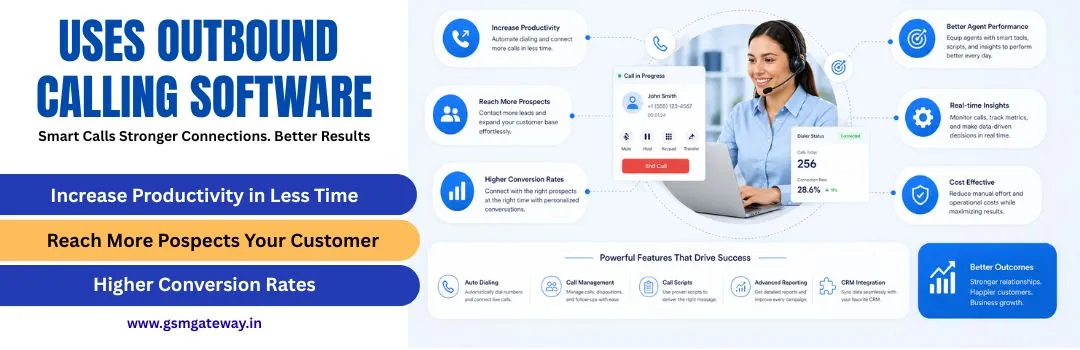
  • Predictive Dialing Engine : The predictive dialer figures out the best number of calls to make at the same time by looking at how many agents are free and past answer patterns. It estimates when an agent will wrap up their current call. Then, it dials the next person ahead of time, so there’s no waiting between calls.

  • Answering Machine Detection (AMD) : AMD technology quickly figures out when a call reaches a voicemail system. At that moment, the call might end, a pre-recorded message could be left, or a callback planned for later. This helps agents by cutting down the time they waste on answering machines.

  • CRM Integration : Outbound calling software works well with CRM platforms such as Salesforce, HubSpot, Zoho, Fresh sales, and even customized systems through API connections. Because of this integration, agents can always access complete customer information. Moreover, call results update customer records automatically.

  • Real-Time Dashboard and Reporting : Managers keep an eye on live campaigns with visual dashboards. These dashboards show information like active calls, agent status, queue metrics, conversion rates, and how the campaign is progressing. At the same time, historical reports help them make strategic decisions.

  • Call Recording and Monitoring : All outgoing calls get recorded so supervisors can ensure quality, provide training, and meet compliance requirements. They might listen to calls as they happen without interrupting, give agents advice that the customer can't hear, or join the call if needed.

  • IVR and Voice Broadcasting : For large-scale notification campaigns, the system automatically plays pre-recorded messages without needing an agent. This feature is perfect for sending out payment reminders, confirming appointments, and making mass announcements.

Outbound vs. Inbound Call Center Software

Outbound vs. Inbound Call Center Software

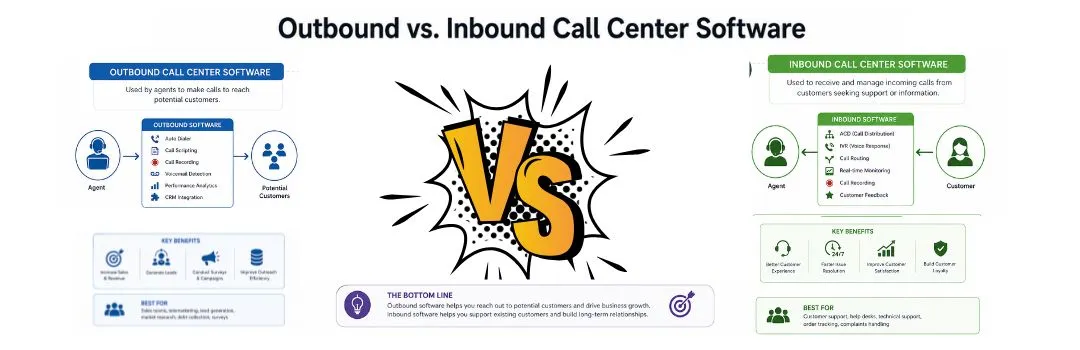
Companies usually need two kinds of software: outbound calling software and inbound call center software. Knowing what makes them different is really important when you are trying to set up the right call center. This means you can make a call center that works well for your business using both outbound calling software and inbound call center software.

Criteria Outbound Calling Software Inbound Call Center Software
Primary Function Makes calls to external contacts Receives calls from customers
Key Technology Auto dialers, AMD, predictive algorithms ACD, IVR, call queue management
Agent Role Proactive — agent initiates contact Reactive — agent responds to contact
Metrics Focus Calls per hour, conversion rate, contact rate FCR, CSAT, average handle time
Best Use Case Sales, collections, surveys, notifications Customer support, helpdesk, order management
Lead Management Built-in campaign and list management Ticket and case management
Call Recording Yes — for compliance and QA Yes — for QA and dispute resolution
Integration CRM, marketing automation Helpdesk, ticketing systems, CRM

Cloud Call Center Software vs. On-Premise Deployment

When choosing software for making outbound calls businesses have to decide between two options: cloud call center software and traditional on-premise systems.

Cloud Call Center Software :

Cloud call center software runs on remote servers and can be accessed by a standard web browser or desktop application. It is relatively easy to get started and usually involves a subscription fee that can last monthly or yearly. The software can be accessed from anywhere, as long as you have a stable internet connection.

It helps in digital calling and managers can track the salespersons very easily and check their reports in their respective accounts. This software helps the management keep a note of how many calls were made by the salespersons. It also allows you to monitor how many calls were connected.

On-Premise Deployment :

On-premise calling software runs on servers located within the business's own data center or office. This approach gives complete control over data and infrastructure.
  • Full control over data sovereignty and security

  • One-time capital expenditure instead of recurring subscription

  • Customization at the infrastructure level

  • No dependence on internet connectivity for internal calls

How GSMGateway.in Powers Outbound Calling Operations

GSMGateway.in is who people in India trust for GSM gateway systems, software for making a lot of calls, and cloud-based call center software. We have a really strong understanding of how phone systems are built, and we use that alongside current software design to give you solutions which are consistently dependable within India’s phone networks.

GSM Gateway Hardware :

You can link mobile phone networks (that use SIM cards) directly to your call centre system with our GSM gateway devices. This means you won't pay as much as you would for standard landlines or only using VoIP, and your calls will be very clear, showing the local number of the caller. Because of this, people are much more likely to answer.

Cloud Auto Dialer Platform :

Our predictive dialler, which is in the cloud, works with predictive, progressive, preview, and power dialling. The system can easily grow from a team of 5 people to a large company with over 500 agents simultaneously on the phone, and you don't need any new equipment for this to happen.

Campaign Management Console :

Administrators can upload lists of contacts, decide how many times to try a call if it doesn't answer, set when calls will happen, make sure you don't call people who have asked not to be contacted, and watch how the campaign is doing, and you can do all of this in one dashboard on the web.

CRM Integration Hub :

GSMGateway.in open API works alongside all the important CRM programs. We have direct connections for Zoho CRM, Salesforce, HubSpot, Freshdesk, and Leadsquared. If you have a CRM your business created, you can use our REST API to make it work with our system.

Analytics and Intelligence Layer :

Our reporting engine delivers 50+ pre-built reports covering agent performance, campaign effectiveness, call quality metrics, and conversion tracking. Custom reports and automated delivery keep management informed without manual data extraction.
What Sets GSMGateway.in Apart :

  • India-specific compliance built in — TRAI DND scrubbing, TCCCPR compliance

  • Multi-SIM support — use multiple carriers simultaneously for better coverage

  • Tier-3 and Tier-4 city coverage — works where pure VoIP solutions fail

  • 24/7 technical support with dedicated account managers

  • Flexible deployment — cloud, on-premise, or hybrid

  • Competitive pricing structured for Indian market conditions

uses-outbound-calling-software

How to Choose the Right Outbound Calling Software

The market offers dozens of calling software options. Businesses that evaluate carefully against these criteria consistently make better purchasing decisions.

Define Your Call Volume Requirements :

Estimate your daily call volume, number of agents, and peak usage periods. Solutions designed for 10-seat teams differ fundamentally from enterprise platforms handling 10,000 calls per day. GSMGateway.in supports any scale with appropriate pricing.

Identify Essential Integrations :

List the systems your call center must connect with — CRM, helpdesk, ticketing, payment gateway, or custom business applications. Verify that any software you evaluate supports these integrations natively or via API before committing.

Assess Call Quality Infrastructure :

Call quality depends on the underlying telecommunications infrastructure. Test the solution under real conditions, not just controlled demos. GSMGateway.in GSM gateway infrastructure delivers consistent call quality across Indian networks, including in areas where VoIP struggles.

Review Reporting and Analytics :

Your calling software should give you complete visibility into operations. Evaluate the depth of real-time monitoring, the flexibility of historical reporting, and whether the system can export data to business intelligence tools you already use.

Getting Started with Outbound Calling Software

A structured implementation process ensures your outbound calling software delivers results from day one.

Planning and Configuration (Week 1) :

  • Define campaign objectives, target contact lists, and success metrics

  • Configure user accounts, agent profiles, and supervisor permissions

  • Integrate CRM and business systems via API or native connector

  • Set up DND scrubbing and compliance parameters

  • Configure caller IDs, hold music, and voicemail scripts

Testing and Quality Assurance (Week 2) :

  • Run test campaigns with small contact samples

  • Validate CRM data sync and call recording functionality

  • Test all dialing modes under realistic load conditions

  • Review reporting dashboards and configure automated reports

  • Conduct supervisor training on monitoring and coaching tools

Agent Training and Soft Launch (Week 3) :

  • Train agents on the softphone interface and call disposition procedures

  • Run parallel operations — manual and automated — to compare performance

  • Collect agent feedback and adjust system settings accordingly

  • Set performance baselines for future comparison

Full Deployment and Optimization (Week 4+) :

  • Launch full-scale outbound campaigns

  • Monitor real-time dashboards and adjust dialing ratios daily

  • Review weekly analytics reports with campaign managers

  • Continuously A/B test call scripts, timing, and contact strategies

Frequently Asked Questions

A predictive dialer uses algorithms to dial multiple numbers simultaneously and predicts agent availability to minimize idle time — it is the most efficient type of auto dialer. The term 'auto dialer' is broader and covers any system that dials automatically, including progressive, preview, and power dialers. Predictive dialing is a specific, high-performance subset of automated dialing.

Outbound calling software eliminates manual dialing, skips busy signals and unanswered calls, and handles answering machine detection automatically. Agents spend time only on live conversations, increasing productive talk time from a typical 10-15 minutes per hour with manual dialing to 45-55 minutes per hour with predictive dialing — a 300% improvement.

Yes. Modern outbound calling software integrates with all major CRM platforms through native connectors or REST APIs. GSMGateway.in provides native integrations for Salesforce, HubSpot, Zoho CRM, Freshsales, and Leadsquared, plus custom API integration for proprietary CRM systems.

Conclusion

The goal of calling software systems is businesses can communicate with their clients with maximum efficiency. Through the complete elimination of the manual dialing system, agents create an efficient and personalized structure for customers, allowing complete confidence with the law, and improved structures for future maintenance. With the correct calling software and structure, efficiency is achieved. Those businesses that rely on complete dialing software report improved efficiency and sales.

Modern voice ecosystems with cloud GSM systems for call center software and harness the potential of the voice call center. Self-sufficient ecosystems. Compliance is built throughout the system and integrates seamlessly with existing systems, providing the best available.
Conclusion